Bridging to Soneium for the First Time: A Calm Walkthrough
Your first bridge to Soneium, step by step: what a bridge does, how long it takes, why the wallet can look empty, and how much gas to bring across.
Base is where most people start in our city. Soneium is the far shore: a second network with its own venues, its own dollars and, for many players, their first real bridge.
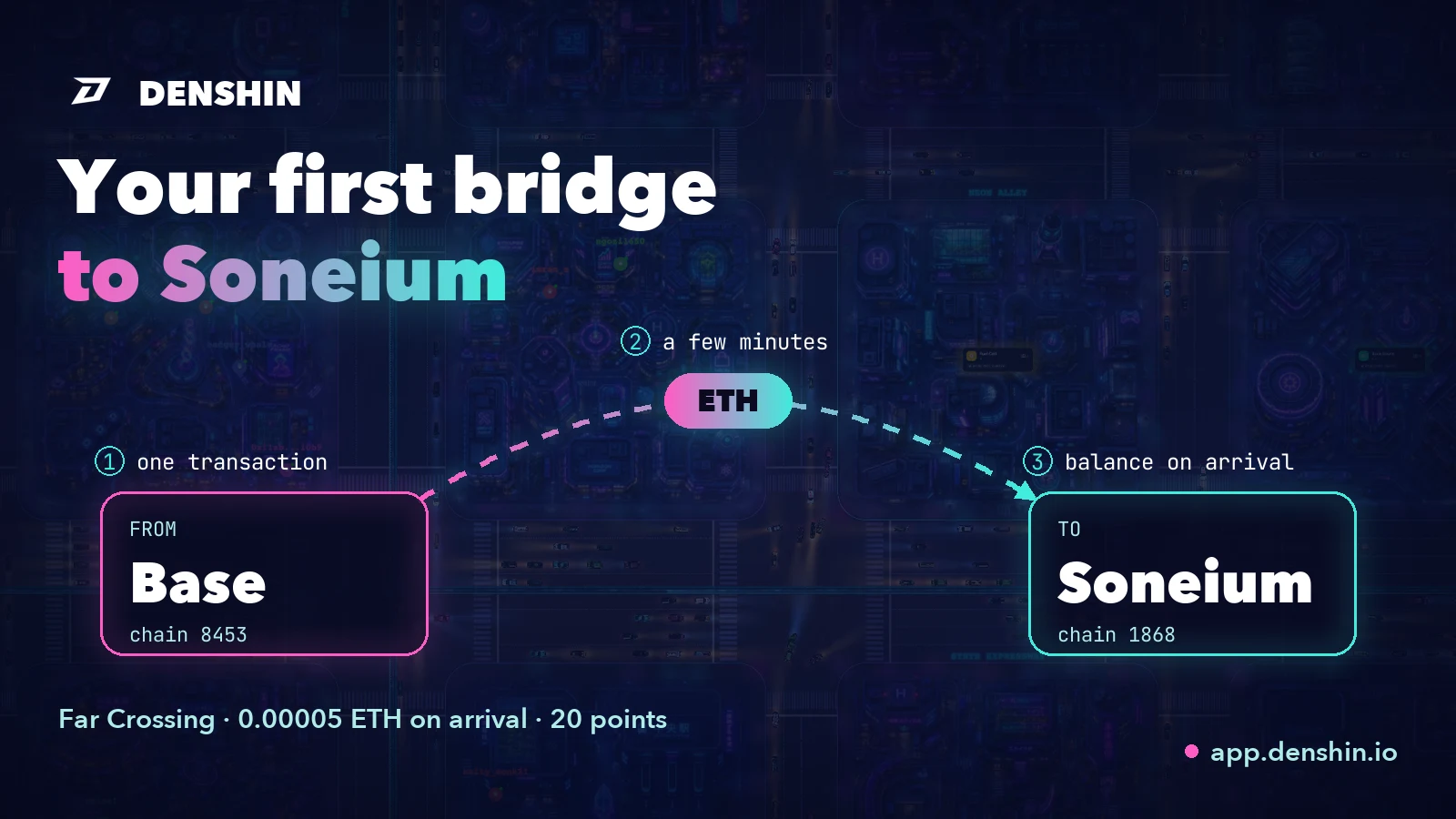
That first bridge feels bigger than it is. Money leaves one network and, for a few minutes, it isn't on either screen. This guide is the calm version of those minutes. In our city the step is a quest called Far Crossing: bring a little ETH over to Soneium and keep it on your main address. It pays 20 points. But nothing below is specific to us. It's how a first bridge works anywhere.
What a bridge actually does#
Networks don't see each other's balances. Your address is the same on Ethereum, Base and Soneium, but each network keeps its own ledger, so the ETH you hold on Base simply doesn't exist as far as Soneium is concerned.
A bridge connects the two ledgers. You make one transaction on the network you're leaving, the bridge takes the ETH there, and the same amount, minus any bridge fee, is released to your address on the other side. Some bridges do it with contracts on both networks, others with liquidity that waits on the destination. For you the shape is the same: one transaction out, a short wait, a balance in.
Before you start: three checks#
- Where the link came from. Open the bridge from the quest or from a bookmark you made yourself. Fake bridge pages are one of the oldest tricks around, and a link from a DM or a reply is never the way in.
- Both networks. "From" is the network your ETH is on now, "To" is Soneium. Read both before you confirm. The classic mistake is the right amount sent between the wrong pair.
- A small amount. Gas on Soneium is paid in ETH, and 0.0005 ETH already covers several times what our Soneium quests cost. Move a little first. You can always cross again.
The crossing, step by step#
1. Open the bridge#
Far Crossing links to the official Soneium bridge, which moves ETH in from Ethereum and from other networks. Connect the same wallet you use in the city.
2. Pick the route and the amount#
Set From to the network your ETH is on, To to Soneium, and type the amount. The preview shows what arrives and what it costs.
Moving plain ETH is a single transaction with a value attached, and it doesn't involve an approval. Approvals are for tokens like USDC, so if the wallet asks you to approve spending of something while you're only moving ETH, stop and look again.
3. Confirm one transaction#
The wallet shows the amount, the network you're leaving and the fee there. That's the only signature the crossing needs.
4. Wait a few minutes#
Now the part that makes people nervous: the ETH has left one side and hasn't reached the other yet. Usually it lands within a few minutes. The bridge page shows the status, and the transaction you sent is already visible on the explorer of the network you left. "Pending" here means "in transit", not "lost".
"My wallet shows nothing"#
This is the most common first-bridge moment, and almost always it's the wallet, not the bridge. Many wallets only show the networks you've added. If Soneium isn't in your list, the ETH is there and the wallet just isn't looking.
Add Soneium: its chain ID is 1868 and its gas token is ETH. Most wallets offer to add it from the bridge page or from their own network list in one click. Switch to it and the balance appears.
If you'd like proof before the wallet catches up, paste your address into Soneium Blockscout, the network's explorer. Your Soneium balance is right there.
What Far Crossing checks#
Far Crossing reads one number: the ETH balance of your main address on Soneium. 0.00005 ETH or more and the quest is done. It's the same idea as Fuel Cell on Base: gas on the shore you're about to work on.
It reads a balance, not a transaction, so it doesn't matter when or how the ETH got there. ETH that was already on Soneium counts too. The check spends nothing and sends nothing to us. Open the quest, press Start, then Verify once the ETH has arrived.
Gas on the other side#
Every action on Soneium pays its fee in ETH, so the ETH you bring is the fuel for everything that follows. Keep a little there after the quest is done: a wallet with no ETH on a network can't do anything on it, not even move its other tokens.
That's the classic trap of a second network. Bring USDC.e or another token to Soneium without any ETH, and the tokens sit there untouchable until some gas arrives.
What's next on the far shore#
Soneium has eight quests in our Genesis season, worth 390 points together. After Far Crossing the natural order is:
- Harbor Stamp: hold 0.10 USDC.e or more, 20 points. Soneium has no dollar of its own. Everything in circulation crossed a bridge to get there, which is why it's called USDC.e.
- Kyo Counter: a swap of 0.10 USDC.e or more on Kyo, one of Soneium's own exchanges, 60 points.
- Sake Cellar and Harbor Berth come later: a supply position in Sake Finance and a liquidity position on Kyo. These are positions you hold, not one-off actions.
What every quest asks and how it's checked is on the Soneium page of our docs. If you're wondering why there's more than one network in the first place, start with what an L2 is.
Try it#
Open app.denshin.io, find Far Crossing among the Soneium quests and press Start. One transaction and a few minutes later, you have a working account on a second network. That's the whole skill, and it's the same on every bridge you'll ever use.